Day 1
Module 1
Syllabus
- Basic coding skills
- working with numeric data,
- and Output, Formatting output.
- Data Types
- String,
- Numeric(int, float, complex),
- Bool,
- List,
- Tuple,
- Dict,
- Set and Frozen Set
- Control statements
- Selection structure (if-else),
- Iteration structure (for, while)
- type assertion
Implicit type conversion
Explicit type conversion (type conver)
# 1
print("Hi Arun CS")
# 2
print("Hey Sneha")
Her Question
Implicit Type Conversion
- Casting is done automatically
x = 5      # int
y = 2.5    # float
z = x + y  # int + float
print(z)   # 7.5
print(type(z))  # <class 'float'>
Explicit Type Conversion
- Casting is done by us
a = "42"
b = int(a)     # converting string to int
c = float(b)   # converting int to float
d = str(c)     # converting float back to string

print(a, type(a))  # "42" <class 'str'>
print(b, type(b))  # 42   <class 'int'>
print(c, type(c))  # 42.0 <class 'float'>
print(d, type(d))  # "42.0" <class 'str'>
Keywords
Python keywords are reserved words that have special meanings and purposes within the Python language
Keywords
| Keyword | Description |
|---|---|
| and | A logical operator |
| as | To create an alias |
| assert | For debugging |
| break | To break out of a loop |
| class | To define a class |
| continue | To continue to the next iteration of a loop |
| def | To define a function |
| del | To delete an object |
| elif | Used in conditional statements, same as else if |
| else | Used in conditional statements |
| except | Used with exceptions, what to do when an exception occurs |
| False | Boolean value, result of comparison operations |
| finally | Used with exceptions, a block of code that will be executed no matter if there is an exception or not |
| for | To create a for loop |
| from | To import specific parts of a module |
| global | To declare a global variable |
| if | To make a conditional statement |
| import | To import a module |
| in | To check if a value is present in a list, tuple, etc. |
| is | To test if two variables are equal |
| lambda | To create an anonymous function |
| None | Represents a null value |
| nonlocal | To declare a non-local variable |
| not | A logical operator |
| or | A logical operator |
| pass | A null statement, a statement that will do nothing |
| raise | To raise an exception |
| return | To exit a function and return a value |
| True | Boolean value, result of comparison operations |
| try | To make a try...except statement |
| while | To create a while loop |
| with | Used to simplify exception handling |
| yield | To return a list of values from a generator |
Datatypes
# 3
print(type(2))
print(type(2.0))
print(type(""))
output
<class 'int'>
<class 'float'>
<class 'str'>
Variables
A variable in Python is like a little label you stick onto a piece of data so you can refer to it later
Eg:
Consider , there is a program in which you have to use 13232132131 this number , its like everywhere in the program
something = 13232132131 / 2
anotherthing = something * 13232132131
sure you can copy paste it but checkout this version
number = 13232132131
something = number /2
anotherthing = something * number
its like giving it a suitable name , so that you can use it by name rather than remembering its value.
Operators
- Arithmetic
Arithmetic Operators
a , b  = 1 , 2
a + b  # 3 "#" is the single line comment
a - b  # -1
a * b  # 2
a / b  # .5
a % b  #  1
b ** 2 # 4
a // b # 0
Comparison Operator
a, b = 5, 10

# Equal to
a == b  # False

# Not equal to
a != b  # True

# Greater than
a > b   # False

# Less than
a < b   # True

# Greater than or equal to
a >= b  # False

# Less than or equal to
a <= b  # True
Logical Operators
x, y = True, False

# AND - True if both operands are True
x and y  # False

# OR - True if at least one operand is True
x or y   # True

# NOT - Inverts the Boolean value 0 -> 1 , 1 -> 0
not x    # False
not y    # True
Membership Operators
lst = [1, 2, 3, 4]
name = "Arun"

# IN - True if value is found in sequence
2 in lst       # True
"run" in name  # True
5 in lst       # False

# NOT IN - True if value is not found in sequence
5 not in lst   # True
"y" not in name # True
Identity Operators
m = [1, 2]
n = [1, 2]
p = m

# IS - True if both variables point to same object
m is p    # True

m is n    # False (same values but different objects)

# IS NOT - True if variables point to different objects
m is not n  # True
print(m is n) # False , different objects even if values are sae
print(m == n) # True same value even if different objects
Bitwise Operators
a , b = 1, 2  # 01 , 10

''' Bitwise AND
  01
& 10 '''
a & b  # 0

#Bitwise OR
# 11
a | b  # 3

# Bitwise XOR

a ^ b  # 3

# Bitwise NOT
# this might be confusing explain later.
~a     # -2

#  Left Shift (<<)

a << 1  # 2

#Right Shift (>>)
a >> 1  # 0
Assignment Operators
x = 10

x += 3  # x = x + 3 → 13
x -= 2  # 11
x *= 2  #  22
x /= 4  # 5.5
x %= 3  #  2.5
x **= 2 #   6.25
x //= 2 #  3.0
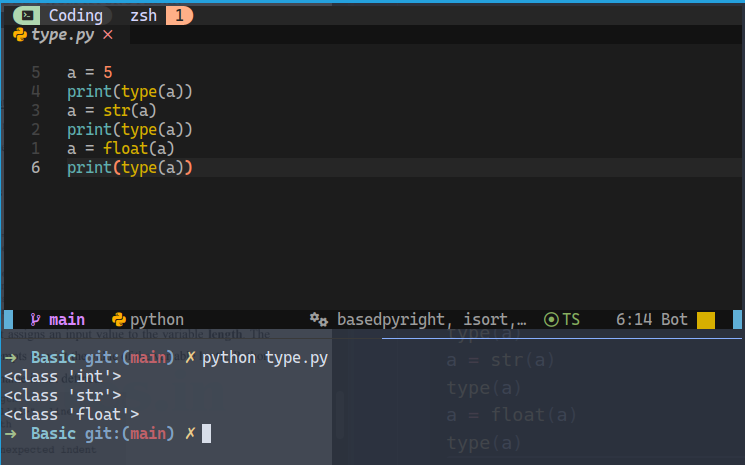
Type Casting
int(3.1) # 3
float(3) # 3.0
str(10) # '10'
a = 5
type(a)
a = str(a)
type(a)
a = float(a)
type(a)
Input , output , processing
# input
a = input("Enter a number")

# output
print(a)
- One thing to note here that the default type will be a string from the
input()and you may need to type cast it to work as expected for example
a = input("Enter a number")
if a==5:
	print("HI")
- this program will not work as expected (run and find out) (happens because
int(5)is not same asstr(5))
a = int(input("Enter a number"))
if a==5:
	print("HI")